Magnatag InSight
The whiteboard and how it helps us brainstorm, innovate, motivate and create
RECENT BLOG POSTS
CATEGORIES
Author: Mike P
Blog Posts by Mike P
7 Steps to Create a Visual Workflow Board for Teams
Thu Aug 13 2026Last updated June 2026
Originally published October 23, 2025. Refreshed with expanded lean manufacturing visual management methods for factory, operations, and continuous improvement teams.
Visual workflow boards transform chaotic team processes into clear, actionable systems that drive productivity, accountability, and collaboration. Whether you're managing software development sprints, marketing campaigns, production schedules, maintenance work orders, quality escapes, or daily factory performance, a well-designed visual workflow board serves as the central nervous system for your team's work.
In lean manufacturing, visual management is more than "putting work on a board." A good visual system makes the difference between normal and abnormal obvious at a glance, shows who owns the next action, and triggers the right response without waiting for another meeting, report, or email thread. The board should help the team see:
What should be happening
What is actually happening
Where work is blocked
Who owns the countermeasure
When the next action is due
Whether yesterday's problem is still open today
We've spent the last sixty years working with teams of all shapes and sizes to help visualize their work; from developing project management systems for small businesses, to designing better ways to track production, sales, service, safety, and staffing workflows. We've come to learn there's no process that can't be visualized. Using our expert guidance, this expanded practitioner guide walks you through seven proven steps to create an effective visual workflow board that aligns your team around shared goals, measurable outcomes, and lean daily management.
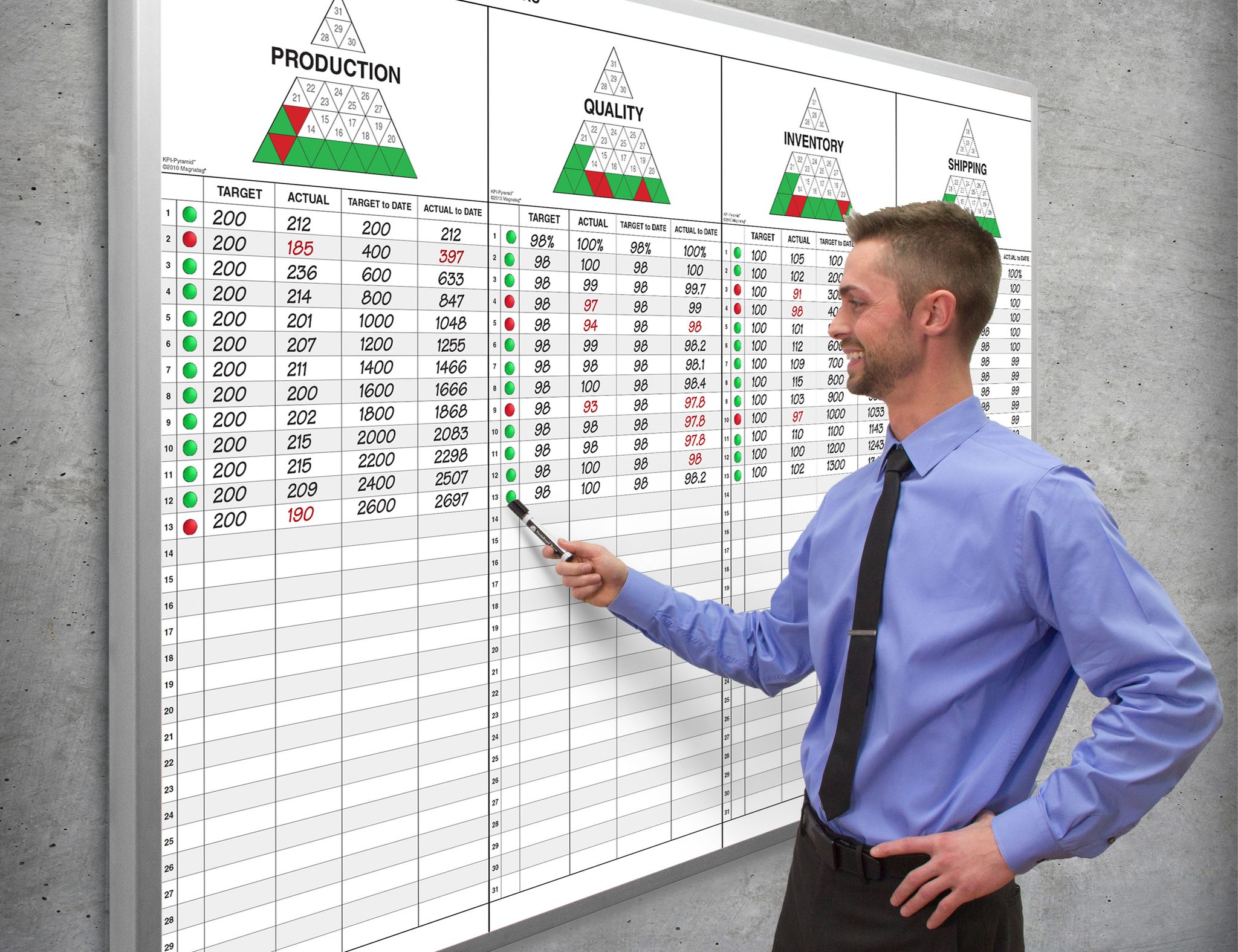
What Makes a Visual Workflow Board "Lean"?
A workflow board becomes a lean visual management tool when it does more than display status. It should help the team expose waste, shorten feedback loops, and improve the process. In practical terms, that means the board should support at least one of these lean purposes:
The strongest visual workflow boards are simple enough for a new team member to understand quickly, but structured enough to drive disciplined daily action.
Step 1: Identify Your Team's Workflow Goals
Before diving into board design, successful workflow visualization begins with defining crystal-clear objectives. The ultimate question you need to ask yourself is, "What am I looking to accomplish?" Teams that establish specific goals for their workflow boards create a foundation for measurable success and sustained adoption across their organization. After all, if you know what you're tracking, you know what needs to be included.
Start by defining what efficiency looks like for your specific team context. For a software development team, this might mean reducing the time between code commits and deployment. For marketing teams, efficiency could translate to faster campaign approvals or clearer content review processes. Customer service teams might focus on reducing response times or improving case resolution rates. In a factory, it might mean improving schedule adherence, reducing changeover delays, exposing quality defects earlier, or keeping 5S audit actions from disappearing after the audit.
Once you've settled on what you're measuring against, document your target outcomes in concrete terms. Rather than vague aspirations like "better communication," specify measurable goals such as "reduce project handoff time," "make all overdue work visible during the daily huddle," or "ensure every red KPI has an assigned countermeasure before the meeting ends." These specific targets become the benchmarks against which you'll evaluate your workflow board's effectiveness.
The business case for workflow visualization is compelling. Research shows that data-driven firms make decisions faster when they visualize their processes effectively. This acceleration occurs because visual workflows turn complex processes into actionable visuals that improve clarity and efficiency across all team members.
Consider creating a simple goals matrix that maps each objective to specific metrics. For example, if your goal is improved task ownership, your metric might be "zero tasks without assigned owners for more than 24 hours." This approach ensures your workflow board serves strategic purposes rather than becoming just another organizational tool.
Lean methodology in practice: stand up a 5S audit board
A 5S audit board is one of the most practical starting points for lean visual management because it connects standards, accountability, and workplace discipline in one visible place. The board should not exist only to post a score. It should make the current condition of the area visible and drive action when the standard is not met.
A strong 5S audit board includes sections for:
Area or zone map
Show the physical area being audited: cell, line, department, warehouse zone, tool crib, maintenance shop, or office space. If the workplace is divided into zones, assign ownership by zone so there is no confusion.5S audit checklist
Organize the checklist around the five 5S categories:Sort: Are unnecessary tools, materials, documents, obsolete parts, and clutter removed?
Set in Order: Are needed items located, labeled, easy to access, and returned to the correct place?
Shine: Is the area clean, inspectable, and free of leaks, dust, debris, or hidden abnormalities?
Standardize: Are visual standards, labels, photos, cleaning routines, and audit criteria clear?
Sustain: Are audits completed on schedule, actions closed, and standards maintained over time?
Audit schedule and owner
Display who performs the audit and when. Many teams use a mix of operator self-checks, supervisor checks, and cross-area audits to keep the system honest.Score or status trend
Use a simple visual trend so the team can see whether the area is improving, holding, or sliding backward. Do not let the score become the only focus. A high score with recurring open actions is not a healthy 5S system.Before and after photos
Photos are powerful visual standards. "What good looks like" should be obvious. Use before/after images when correcting a condition, and use standard-condition photos for recurring checks.Red-tag or abnormality parking lot
Create a section for items that need disposition: unknown parts, excess inventory, broken tools, obsolete fixtures, expired materials, or unneeded documents. Each item should have an owner and decision date.Countermeasure/action register
Every audit gap should become an action item with:Problem or finding
Area or location
Owner
Due date
Current status
Verification of closure
A simple 5S audit board layout can look like this:
The key is to make 5S a living management system. If the board only records audit scores, it becomes wallpaper. If it exposes gaps, assigns owners, and verifies follow-through, it becomes a lean visual control.
Step 2: Break Down the Workflow into Manageable Tasks
Complex workflows become manageable when decomposed into distinct, actionable steps. This breakdown prevents the confusion and miscommunication that often plague teams working with poorly defined processes. In fact, we find the process so effective that we've developed a project management board specifically designed for step-by-step breakdowns.
Begin by mapping your entire workflow from start to finish. Gather your team for a collaborative session where you trace each step of your current process, regardless of how informal or inconsistent it might be. Document every handoff, decision point, and deliverable, even those that seem obvious or automatic. After a few conversations, you should have a strong feel for where these breakout steps belong in your overall project timeline.
Transform this comprehensive map into discrete, manageable actions. Each task should be specific enough that team members understand exactly what needs to be accomplished and when it's considered complete. Instead of "review content," specify "review blog post for grammar, brand voice, and SEO optimization." Instead of "run job," specify "complete setup, verify first-piece approval, run production, record downtime, and move completed quantity to inspection." These milestones become checkpoints throughout your project timeline.
Research confirms that breaking down complex tasks reduces confusion and miscommunication significantly. This improvement occurs because smaller, well-defined tasks eliminate ambiguity about expectations and deliverables.
Create a structured task inventory using a simple table format:
This systematic approach to task breakdown becomes the foundation for your visual workflow board's structure and ensures nothing falls through the cracks during implementation.
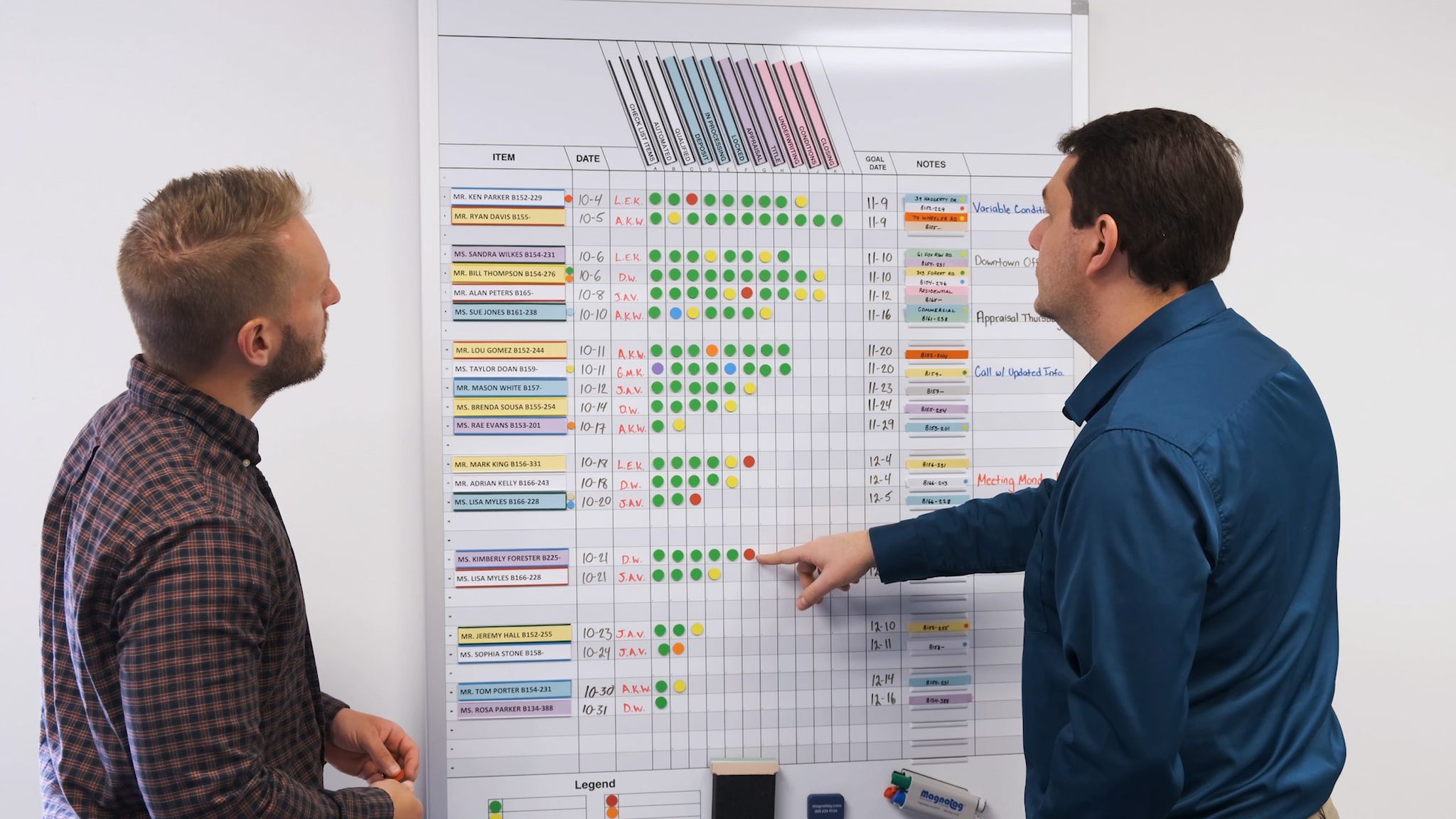
Step 3: Assign Clear Roles and Responsibilities
Accountability thrives when every team member understands their specific responsibilities within the workflow. Clear role assignment eliminates the ambiguity that leads to missed deadlines, duplicated efforts, and finger-pointing when problems arise.
Document exactly who owns each task or workflow stage. This can be done via a digital assignment tracking tool or right on the project management system itself. Wherever you choose to list assignments, you need to make sure assignees are aware of the ownership. Assignments need to be highly visible and eliminate any confusion. Avoid shared ownership without clear primary responsibility, as this often results in tasks falling through the cracks. Instead, designate a single point person for each major workflow component while identifying supporting team members who contribute to the process.
Effective role clarity requires outlining both responsibilities and deliverables. Specify not just who does what but what constitutes successful completion of each responsibility. This clarity reduces potential overlaps and missed steps that can derail even well-intentioned team efforts.
Consider implementing a responsibility matrix that maps tasks to team members:
This structured approach to role assignment creates transparency around expectations and provides clear escalation paths when issues arise. Team members can quickly identify who to contact for questions, approvals, or problem resolution.
Regular role clarification sessions help maintain accountability as teams evolve and workflows change. Schedule quarterly reviews to ensure role assignments remain current and effective for your team's changing needs.
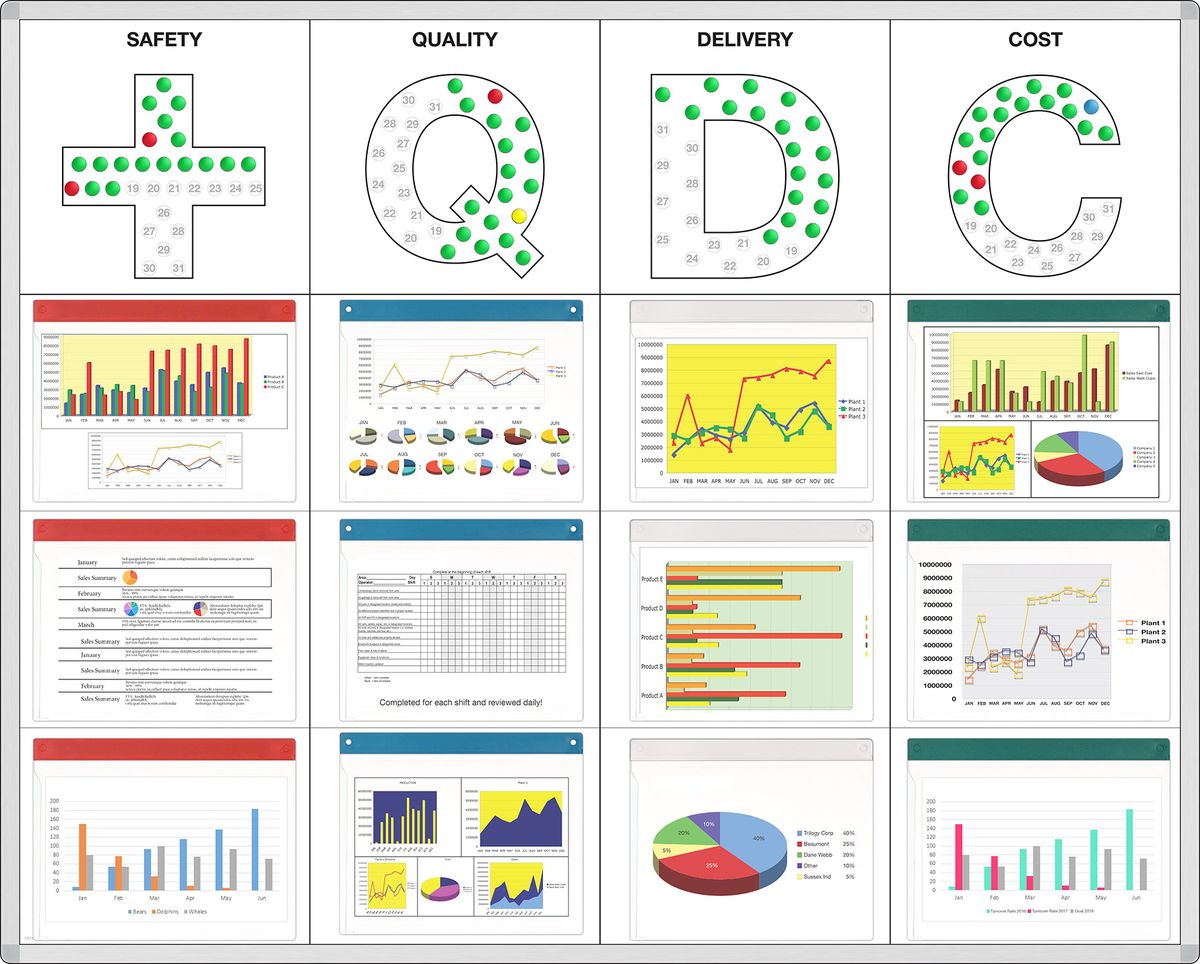
Lean methodology in practice: run an SQCDP daily management cadence
In manufacturing and operations environments, one of the most effective ways to turn role clarity into daily accountability is an SQCDP board. SQCDP stands for:
Safety
Quality
Cost
Delivery
People
SQDC boards are typically used in a daily tier or standup meeting rhythm. The purpose is not to give long updates. The purpose is to compare actual performance to target, identify abnormalities, assign countermeasures, and escalate problems that cannot be solved at the current level.
A practical SQCDP board should answer five questions every day:
A typical tiered cadence may look like this:
The rhythm matters. If the board is only updated before a weekly meeting, the team loses the daily management benefit. A useful SQCDP routine includes:
Update before the huddle
Owners update yesterday's actuals, red/green status, blockers, and open actions before the meeting starts.Start with Safety
Safety should not be buried at the end of the meeting. Discuss unsafe conditions, near misses, and open safety countermeasures first.Review red conditions first
Green items should move quickly. The team's attention should go to abnormalities and decisions.Assign one owner per action
Every red SQCDP item needs a clear owner, due date, and next step. "Team to review" is not ownership.Escalate unresolved issues
If a problem cannot be solved at Tier 1, it should move visibly to the next tier with context, not disappear into a side conversation.Close the loop
Completed actions should be verified, not simply erased. If the same problem returns, it may require root cause analysis instead of another quick fix.
An SQCDP board creates a practical daily management cadence because it forces the organization to look at performance through a balanced lens. Delivery cannot improve at the expense of safety. Cost cannot improve by hiding quality problems. People gaps cannot be ignored until they become schedule misses.
Step 4: Choose the Right Visual Board and Document Your Workflow
Selecting the appropriate visual format for your workflow board determines how effectively your team can interpret and act on the information presented. Different visualization approaches serve different workflow types and team preferences.
A Kanban board uses columns and cards to represent task stages and progress, making it ideal for continuous workflows where tasks move through predictable stages. Software development teams often favor Kanban boards for tracking features from backlog through deployment, while marketing teams use them to manage content from ideation through publication. In manufacturing, Kanban boards can also support replenishment, production authorization, maintenance requests, tooling queues, and internal service workflows.
Flowcharts employ shapes and arrows to represent process steps and decision points, excelling at mapping workflows with multiple decision branches or complex approval processes. These diagrams work particularly well for documenting procedures that involve conditional logic or multiple possible outcomes.
Swimlane diagrams divide workflows into parallel lanes for different roles or departments, providing exceptional clarity for cross-functional processes. When workflows involve multiple departments or external stakeholders, swimlane diagrams prevent confusion about who handles each step.
The key to choosing the right format lies in matching your workflow's characteristics to each visualization method's strengths. Simple, linear processes work well with basic Kanban boards, while complex, multi-departmental workflows benefit from swimlane diagrams.
Document your chosen workflow visually using your selected format. This central, visual reference streamlines teamwork and avoids miscommunications by providing a single source of truth for process expectations. Include all task dependencies, decision points, and handoff requirements in your documentation.
Create a legend or key that explains your visual conventions. Define what different colors, shapes, or symbols mean within your workflow board context. This standardization ensures new team members can quickly understand and contribute to the workflow process.
Lean methodology in practice: match the board type to the management problem
Lean visual management works best when the board format fits the problem you are trying to control. Do not start with the board template. Start with the management need.
A few practical design rules apply to almost every lean board:
Make abnormal conditions visual. Red, yellow, blocked, overdue, or "help needed" indicators should stand out.
Put decisions near the work. Boards used by frontline teams should be located where the work is discussed, not hidden in a conference room.
Use physical space deliberately. If a section is important, give it enough room. Tiny action registers discourage use.
Limit clutter. A board that tries to show everything usually helps with nothing.
Show ownership. Names, initials, owner magnets, or lanes should make accountability obvious.
Show timing. Due dates, aging, review dates, and shift/day markers prevent stale information.
Include a board standard. Add a small "how to use this board" legend or standard work note.
Step 5: Communicate the Workflow Board to Your Team
Successful workflow board implementation depends on clear communication and team buy-in. Even the most thoughtfully designed board fails if team members don't understand how to use it effectively or why it benefits their daily work.
Present your workflow board in a dedicated team meeting where you can explain each element and answer questions in real time. Walk through several example scenarios that demonstrate how different types of tasks or projects would flow through the board. This hands-on explanation helps team members visualize how the board applies to their specific responsibilities.
Develop a communication plan that includes regular check-ins and feedback sessions during the initial implementation period. Schedule weekly touchpoints for the first month to address questions, confusion, or suggested improvements. This proactive communication approach prevents small issues from becoming major adoption barriers.
Effective communication about workflow processes prevents misinterpretation and encourages goal-driven collaboration across all team members. When everyone understands not just how to use the board, but why it exists and how it supports team goals, adoption rates increase significantly.
Create quick reference materials that team members can consult independently. A simple one-page guide explaining board conventions, common workflows, and troubleshooting steps empowers team members to use the board confidently without constant supervision.
Consider appointing workflow champions within your team who can provide peer support during the transition period. These champions help answer questions and reinforce proper board usage through informal coaching and encouragement.
Step 6: Schedule Regular Reviews to Monitor Progress
Periodic workflow reviews transform your visual board from a static tool into a dynamic system that continuously improves team performance. These structured evaluations help identify bottlenecks, celebrate successes, and adapt processes to changing business needs.
Establish recurring check-ins at intervals that match your workflow's natural rhythm. Weekly reviews work well for fast-moving projects with short task cycles, while monthly reviews suit longer-term initiatives or strategic planning workflows. In production environments, some boards require shiftly, daily, or even hourly review. The key is consistency rather than frequency.
Use concrete data points to drive your review discussions. Track metrics like task completion times, bottleneck frequency, missed deadlines, aging work, blocked work, rework, first-pass quality, schedule misses, and team satisfaction scores. These objective measures provide clear indicators of workflow effectiveness and highlight areas needing attention.
Uncovering bottlenecks with workflow visualization supports faster, smarter adjustments to team processes. Visual boards make performance patterns obvious, allowing teams to spot recurring problems and implement targeted solutions.
Create a simple review checklist that guides each session:
Which tasks consistently take longer than expected?
Where do tasks get stuck most frequently?
Are team members clear about their responsibilities?
What feedback has the team provided about the current process?
Which workflow elements are working particularly well?
Which overdue items need escalation?
Which red metrics do not yet have countermeasures?
Which closed actions need verification?
Which board sections are not being updated or used?
Document review findings and the resulting process adjustments. This historical record helps teams understand how their workflows evolve over time and provides valuable context for future improvements.
Lean methodology in practice: review target vs. actual and respond with PDCA
In lean daily management, the review is not just "What happened?" It is:
What was the target?
What was the actual condition?
What is the gap?
What caused the gap?
What countermeasure are we testing?
Who owns it and by when?
How will we check whether it worked?
This is the Plan-Do-Check-Act cycle applied at the board.
A practical review standard can look like this:
For production boards, use reason codes or simple categories to understand recurring gaps. For example, if delivery misses occur repeatedly, categorize the reasons: material shortage, changeover delay, equipment downtime, quality hold, staffing gap, engineering change, or schedule conflict. Once reasons are visible, the team can use Pareto thinking to focus on the biggest drivers instead of treating every miss as a one-off incident.
A strong review routine has three levels:
Daily or shift review
Focus on immediate abnormalities, safety issues, blocked work, and actions due now.Weekly trend review
Look for patterns: recurring bottlenecks, repeat defects, chronic late handoffs, or aging work.Monthly improvement review
Decide whether the workflow, staffing, standard work, training, or board design needs to change.
If the board does not change behavior during the review, it is not yet functioning as visual management. A board review should end with decisions, not just discussion.
Step 7: Refine and Improve Your Workflow Continuously
Workflow optimization is an ongoing process that requires regular refinement based on real-world experience and changing business requirements. The most effective visual workflow boards evolve continuously to serve their teams' changing needs.
Collect feedback systematically from all workflow participants. Create simple feedback mechanisms like monthly surveys, suggestion boxes, or dedicated discussion sessions where team members can propose improvements. Front-line workers often identify optimization opportunities that managers miss.
Documenting and refining workflows helps teams spot automation opportunities and boost performance significantly. As you refine your processes, look for repetitive tasks that could be automated, redundant steps that could be eliminated, or bottlenecks that could be resolved through resource reallocation.
Common refinement examples include reassigning steps to more appropriate team members, combining redundant stages that don't add value, introducing new workflow columns that provide better visibility into task status, or adding blocked-work indicators so problems surface earlier. Each adjustment should address a specific problem or opportunity identified through your regular reviews.
Test workflow changes incrementally rather than implementing major overhauls all at once. Small, focused improvements allow you to measure impact clearly and roll back changes that don't deliver expected benefits. This iterative approach reduces disruption while maintaining momentum toward better processes.
Celebrate workflow improvements with your team. When refinements lead to faster delivery times, reduced errors, improved safety response, fewer missed handoffs, or improved job satisfaction, acknowledge these wins publicly. Recognition reinforces the value of continuous improvement and encourages ongoing participation in optimization efforts.
Visual Workflow Board Design Checklist
Use this checklist before finalizing your board design.
Example Factory Visual Management Board Layouts
Below are practical board layouts you can adapt for lean manufacturing, operations, maintenance, quality, or cross-functional teams.
1. Production Daily Management Board
2. Hour-by-Hour Production Board
3. 5S Audit Board
4. Kaizen Event Board
5. Maintenance / TPM Board
Frequently Asked Questions
What are the key benefits of using a visual workflow board?
Visual workflow boards simplify complex processes by making abstract workflows concrete and actionable. They improve clarity by showing exactly where each task stands in the overall process, highlight bottlenecks before they become major problems, and foster collaboration by providing a shared understanding of team responsibilities.
Teams using visual workflow boards, like those created with Magnatag, make decisions faster because they can quickly assess current status, resource allocation, blocked work, and ownership without lengthy status meetings or email chains. In lean manufacturing environments, the board also helps expose abnormalities, support daily management, and connect problems to countermeasures.
What is visual management in lean manufacturing?
Visual management in lean manufacturing is the practice of making work status, standards, problems, and performance visible so teams can understand the current condition at a glance and take action. The goal is not decoration or reporting. The goal is faster recognition and response.
A lean visual management system often includes production boards, SQCDP boards, 5S audit boards, Kanban systems, Andon signals, hour-by-hour boards, training matrices, maintenance boards, A3 boards, and kaizen tracking boards. The best systems show the gap between target and actual and make ownership of the next step clear.
How do I choose between different types of workflow boards?
Select your workflow board type based on your process complexity, team structure, and management need. Kanban boards excel at managing task flow through predictable stages, making them ideal for development teams, content creation workflows, internal service queues, replenishment systems, or maintenance requests.
Flowcharts work best for mapping decision-heavy processes with multiple possible outcomes, such as customer service escalation procedures or quality containment decisions. Swimlane diagrams provide the clearest view of role-based responsibilities in cross-functional workflows involving multiple departments or external stakeholders.
For factory daily management, consider SQCDP boards, hour-by-hour boards, 5S boards, kaizen boards, and production control boards depending on the problem you need to manage.
What should be included on a production visual management board?
A production visual management board should show the information the team needs to run the day and respond to abnormalities. Common sections include:
Safety status and open safety actions
Quality issues, defects, scrap, or rework
Production plan vs. actual output
Delivery risks or late orders
Equipment downtime or maintenance concerns
Staffing and training needs
Material shortages or constraints
Blocked work or escalations
Countermeasures with owners and due dates
The most important section is usually the action register. If the board shows red metrics but does not track owners and countermeasures, it is reporting performance, not managing performance.
How often should a visual workflow board be updated or reviewed?
Review your workflow board regularly to ensure it reflects current priorities and processes. Weekly reviews work well for fast-paced project teams with short task cycles, while monthly reviews suit longer-term projects or strategic initiatives.
In manufacturing and operations environments, many boards require a faster cadence:
Hour-by-hour boards: updated during the shift
SQCDP boards: reviewed daily
Tier meeting boards: reviewed at each tier cadence
5S audit boards: updated during scheduled audits and action reviews
Kaizen boards: updated daily during events and weekly during follow-up
Project boards: updated at least weekly, or whenever status changes
The key is establishing a consistent rhythm that catches emerging bottlenecks early while avoiding review fatigue. Update the board immediately when processes change, but evaluate the board's overall effectiveness during scheduled review sessions.
What is an SQCDP board?
An SQCDP board is a lean daily management board organized around Safety, Quality, Cost, Delivery, and People. It helps teams review performance in a balanced way so one priority does not hide another. For example, a team should not celebrate delivery success if quality issues, safety risks, or staffing problems are being ignored.
An SQCDP board is usually reviewed during a short daily huddle. Each red or abnormal condition should have a countermeasure, owner, and due date. Issues that cannot be solved at the frontline level should be escalated through the tier management process.
How is a 5S audit board different from a general workflow board?
A general workflow board tracks work moving through a process. A 5S audit board tracks workplace organization and sustainment against defined standards. It typically includes the five 5S categories: Sort, Set in Order, Shine, Standardize, and Sustain.
A strong 5S audit board should include audit criteria, schedule, area ownership, score or status trend, red-tag items, before/after photos, and an action register. The action register is what turns a 5S board from a scoring tool into an improvement tool.
How do kaizen event tracking boards support continuous improvement?
Kaizen event tracking boards make improvement work visible. They help teams track the event charter, current state, waste observed, improvement ideas, future state, action items, owners, due dates, before/after results, and sustainment checks.
The board prevents a common kaizen failure: generating good ideas during the event but losing follow-through afterward. By keeping actions visible until closure, the team can verify whether improvements were implemented and sustained.
What common challenges arise when implementing a workflow board?
Teams frequently encounter resistance to new tools, especially from members comfortable with existing processes. Combat this by clearly communicating benefits and providing adequate training. Unclear role definitions create confusion about who updates the board and when, so establish specific responsibilities for board maintenance.
Inconsistent updates render boards useless, making it essential to integrate board updates into daily routines rather than treating them as optional activities. Other common issues include:
Too many metrics and not enough action
Board located away from the work
Red items without owners
Old information left on the board
Leadership using the board for blame instead of problem solving
No standard for colors, symbols, or status definitions
Digital and physical systems that contradict each other
Board reviews that become long meetings instead of focused decisions
How can visual workflow boards improve team collaboration and accountability?
Visual workflow boards increase transparency by making task ownership and status visible to all team members. This visibility eliminates the need for constant status check-ins and reduces the risk of tasks falling through the cracks. Team members can quickly identify dependencies, offer assistance when colleagues are overloaded, and coordinate their efforts more effectively.
The public nature of visual boards also creates natural accountability, as everyone can see who owns which tasks and how quickly work progresses through the system. In a lean environment, this accountability should be process-focused rather than blame-focused. The board should help the team ask, "What in the process allowed this gap to happen, and what countermeasure are we testing?"
What is the difference between a Kanban board and a visual management board?
A Kanban board is one type of visual management board. It is designed to manage flow, limit work in process, and show work moving through defined stages. A visual management board is a broader category that can include Kanban boards, SQCDP boards, 5S audit boards, hour-by-hour boards, kaizen boards, A3 boards, and other visual controls.
Use a Kanban board when the main problem is managing work-in-process and flow. Use other visual management formats when the main problem is daily performance, safety, quality, 5S sustainment, improvement tracking, or escalation.
Should a visual workflow board be physical, digital, or both?
The right format depends on where the work happens and how the team manages it. Physical boards are especially effective in factories, warehouses, labs, maintenance shops, and team areas where people gather around the work. They are visible, immediate, and easy to update during a standup.
Digital boards are useful for remote teams, multi-site workflows, and processes that require system integration or historical reporting. Many organizations use both: a physical board for daily management at the point of work and a digital system for recordkeeping, reporting, or cross-site visibility.
The key is to avoid duplicate systems that disagree. If you use both, define which system is the source of truth for each type of information.
Final Takeaway
A visual workflow board is effective when it changes the way the team manages work. It should make priorities visible, expose problems early, clarify ownership, and create a reliable cadence for action. In lean manufacturing, the board should also reinforce standard work, daily management, 5S discipline, problem solving, and continuous improvement.
Start with the workflow goal. Break the work into visible steps. Assign clear ownership. Choose the right board format. Communicate the system. Review it consistently. Improve it continuously.
When those seven steps are followed, the board becomes more than a place to write updates. It becomes a practical management system the team can use every day.
Whiteboard Wall Kits for Modern Offices — Top Picks 2026
Wed Aug 5 2026The best whiteboard wall kits for modern offices in 2026 include steel whiteboard panels for commercial-grade buildings seeking durability, dry erase film for those needing budget-friendly flexibility, and premium glass whiteboard walls for executive spaces prioritizing aesthetics. A whiteboard wall kit transforms an ordinary surface into a large-scale writable area, offering significantly more collaboration space than traditional framed whiteboards while integrating seamlessly into contemporary office design. This guide compares the top options across panels, paint, and film to help you select the right whiteboard material for your workspace needs and budget.
What Is a Whiteboard Wall Kit?
A whiteboard wall kit is a complete system designed to convert any wall surface into a dry erase writing area, typically including the writable surface material, mounting hardware or adhesive, and installation instructions. Unlike standalone whiteboards that hang on a wall and occupy limited space, whiteboard wall kits create expansive marker board surfaces that can span entire walls from floor to ceiling.
These kits come in three primary formats: rigid panels that mount directly to the wall, paint that applies over existing surfaces, and adhesive film or wallpaper that sticks to smooth walls. Each format serves different installation requirements, budgets, and aesthetic preferences.
The key advantage of a whiteboard wall over a traditional framed whiteboard is scale. A full wall whiteboard provides unlimited brainstorming real estate for teams, eliminates the visual clutter of multiple smaller boards, and creates a modern, streamlined appearance that aligns with contemporary office design standards.
Whiteboard Panels vs. Paint vs. Dry Erase Film
Whiteboard panels, paint, and dry erase film each offer distinct advantages depending on your office environment, installation constraints, and long-term durability requirements.
Whiteboard panels are rigid panels made from materials like porcelain-coated steel or glass that mount to the wall using screws, adhesive, or specialized mounting systems. Steel-backed whiteboard panels offer magnetic functionality, allowing teams to attach documents, charts, and visual aids alongside written content. Panels deliver the most durable writing surface with the longest lifespan, often lasting decades in commercial environments without ghosting or staining.
Whiteboard paint transforms existing walls into writable surfaces by applying a specialized coating directly over drywall or other substrates. This option works well for irregular wall shapes. However, whiteboard paint requires careful surface preparation, multiple coats, and extended curing time. The writing quality and erasability depend heavily on application technique, and painted surfaces typically show wear faster than panels.
Dry erase film is a whiteboard sheet for wall applications that uses peel-and-stick adhesive to create an instant writable surface. Film installs quickly without tools or professional help, making it ideal for rental spaces or temporary installations—assuming you're not afraid of a little hard work when it comes time to repurpose your space. While film offers the lowest upfront cost, taking it off the wall is no slight feat; much like wallpaper, films can be very stubborn. Film surfaces may also bubble, peel, or lose adhesion over time, particularly in high-humidity environments or on textured walls.
Feature | Whiteboard Panels | Whiteboard Paint | Dry Erase Film |
|---|---|---|---|
Durability | Highest — decades of use | Moderate — 5-10 years | Lower — 2-5 years |
Installation | Professional recommended | DIY possible, prep-intensive | DIY-friendly |
Magnetic option | Yes (steel panels) | No | No |
Surface quality | Consistent, premium, factory-finished | Variable, depends on application | Consistent when new, degrades over time |
Removal | Leaves mounting holes | Requires repainting | Stubborn to remove, may leave behind residue |
Best for | Permanent installations | Seamless custom shapes | Temporary, budget-conscious spaces |
Best Whiteboard Wall Kits for Commercial Spaces
Facilities managers at mid-size companies need whiteboard wall solutions that prioritize durability, low maintenance, and professional-grade performance over years of daily use. Steel whiteboard wall panels represent the optimal choice for this buyer profile.
Steel whiteboard panels, such as WhiteWall magnetic dry-erase systems, deliver the permanence and reliability that facilities managers require when making capital purchases. These panels feature porcelain-enamel or ceramic-steel surfaces that resist ghosting, staining, and scratching even under heavy use. The magnetic functionality allows teams to attach printed materials, project timelines, and visual references directly to the writing surface.
Panel systems are available in both vertical and horizontal orientations to accommodate various room configurations. Vertical panels can reach heights up to 118 inches with widths of 48 inches, enabling true floor-to-ceiling coverage in standard commercial spaces. Multiple panels can be installed edge-to-edge to create a continuous mural whiteboard surface across an entire wall.
For facilities managers evaluating large whiteboard for wall installations, key specifications to consider include surface material composition, warranty length, and mounting system requirements. Porcelain-coated steel offers superior longevity compared to melamine alternatives, while concealed mounting hardware and frameless, rolled edges creates a cleaner finished appearance.
The installation process for panel systems varies by manufacturer. Some panels, like WhiteWall, can be installed using simple hand tools. Others may require professional mounting to ensure level alignment and secure attachment. However, this one-time installation investment pays dividends through minimal ongoing maintenance—steel panels require only standard dry erase cleaning and occasional conditioning to maintain optimal performance.
Budget-Friendly Whiteboard Walls for Startups
Startups and growing companies need whiteboard wall solutions that maximize collaboration space without requiring significant capital investment or permanent modifications to leased office space. Dry erase film and wallpaper products offer the best value proposition for this buyer profile.
Adhesive whiteboard film transforms any smooth wall into a writable surface within minutes, with no drilling, mounting hardware, or professional installation required. This makes it ideal for startup environments where teams may relocate as they scale, or where lease agreements restrict permanent modifications.
Whiteboard wallpaper products function similarly to traditional wallpaper but feature a dry erase coating that accepts standard markers. These products peel away cleanly when removed, occasionally leaving behind residue—something that should come as no surprise to anyone with previous wallpaper removal experience.
For startups operating in smaller offices, a whiteboard sheet for wall applications can convert a single accent wall into a brainstorming hub without the expense of outfitting an entire room. Even a modest 4-by-6-foot section provides meaningful collaboration space for small teams while keeping costs under control.
When evaluating budget-friendly options, startups should consider surface longevity alongside upfront price. While film products cost less initially, they may require replacement every few years as adhesion weakens or the writing surface degrades. For companies planning to remain in their space for three or more years, investing in entry-level panel systems may deliver better total cost of ownership.
The most practical approach for many startups combines film or wallpaper in high-traffic collaboration areas with traditional marker boards in individual offices or smaller meeting rooms. This hybrid strategy balances budget constraints with the need for adequate writable surface area as teams expand.
Premium Glass Whiteboard Walls for Executive Spaces
Design-conscious executives and creative directors require whiteboard solutions that enhance sophisticated office environments without compromising brand image or aesthetic standards. Premium glass whiteboard walls deliver the sleek, contemporary appearance that executive meeting rooms and client-facing spaces demand.
Glass whiteboard walls use optically clear, low-lead glass panels with a ceramic frit backing that creates the writable surface. The result is a luminous, reflective finish that elevates room aesthetics while providing full dry erase functionality. Unlike painted or film surfaces, glass maintains its pristine appearance indefinitely with proper care.
The VisuGlass WhiteWall system exemplifies the premium glass whiteboard category, featuring floor-to-ceiling panels with frameless finished edges that create an uninterrupted visual plane. This frameless design eliminates the utilitarian appearance of traditional framed whiteboards, allowing the glass surface to integrate seamlessly with high-end interior finishes.
For executive spaces, glass whiteboard walls serve dual purposes: functional collaboration surfaces during working sessions and sophisticated design elements when not in active use. The reflective quality of glass adds depth and light to rooms, while the clean lines complement modern furniture and architectural details.
Color options extend beyond traditional white to include gray, black, and custom-matched hues that coordinate with existing office palettes. Darker glass surfaces create dramatic visual impact in boardrooms while maintaining full erasability with standard dry erase markers.
Installation of glass whiteboard walls requires professional handling due to panel weight and the precision alignment needed for multi-panel configurations. However, the investment in professional installation ensures a flawless finished appearance appropriate for spaces where first impressions matter.
How to Choose the Right Whiteboard Material for Your Office
Selecting the right whiteboard material requires evaluating your specific workspace requirements across five key criteria: installation permanence, surface durability, magnetic functionality, aesthetic requirements, and budget constraints.
Installation permanence determines whether you need a removable solution or can commit to a fixed installation. Rental spaces and rapidly growing companies benefit from cheap film or wallpaper. Owned facilities or long-term leases justify the investment in permanent panel or glass systems.
Surface durability correlates directly with daily usage intensity. High-traffic collaboration spaces with multiple daily users require porcelain-steel or glass surfaces that resist ghosting and maintain erasability over years of use. Lower-traffic applications like personal offices or occasional meeting rooms can function well with film or painted surfaces.
Magnetic functionality matters when teams need to attach printed documents, photos, or visual materials alongside written content. Only steel-backed panels offer true magnetic capability — glass, paint, and film surfaces do not hold magnets. If your workflow involves pinning reference materials to the writing surface, steel panels are the only viable option.
Aesthetic requirements vary significantly by office environment and brand positioning. Executive spaces and client-facing rooms warrant premium glass or high-end frameless whiteboard panels. Back-office collaboration areas and startup environments can prioritize function over finish with film or standard panel options.
Budget constraints must account for both upfront costs and total cost of ownership. Film products offer the lowest initial investment but require regular replacement. Panel and glass systems cost more upfront but deliver decades of service with minimal maintenance, often proving more economical over a ten-year horizon.
For most mid-size office environments, steel whiteboard panels represent the optimal balance of durability, functionality, and value. Startups should consider film for pricing, while design-forward organizations should invest in glass or framless porcelain for spaces where aesthetics drive the decision.
Transform Your Workspace with Magnatag
Modern offices require collaboration surfaces that match the pace and creativity of today's teams. Whether you manage facilities for a growing mid-size company, lead operations at a scaling startup, or oversee design standards for an executive suite, the right whiteboard wall kit transforms how your teams brainstorm, plan, and communicate.
Magnatag offers professional-grade whiteboard wall systems engineered for commercial durability and contemporary aesthetics. From magnetic framelss WhiteWall panels that support decades of daily use to premium VisuGlass glass whiteboard walls that elevate executive meeting rooms, Magnatag provides solutions tailored to every office environment and budget.
The investment in quality whiteboard wall surfaces pays dividends through enhanced team collaboration, reduced maintenance requirements, and workspace aesthetics that reflect your organization's commitment to excellence. Unlike temporary solutions that degrade over time, Magnatag's panel and glass systems maintain their performance and appearance year after year.
Explore the full range of whiteboard wall options to find the ideal solution for your modern office. Your walls have untapped potential — transform them into the collaboration surfaces your teams deserve.
Frequently Asked Questions
What is a whiteboard wall, and how is it different from a regular whiteboard?
A whiteboard wall is a large-scale dry erase surface that covers a significant portion of a wall, often from floor to ceiling, rather than a standalone board that hangs in a fixed frame. Unlike regular whiteboards that occupy limited space and create visual clutter, whiteboard walls integrate seamlessly into room architecture and provide expansive writing area for team collaboration. Whiteboard walls can be created using rigid panels, specialized paint, or adhesive film applied directly to existing wall surfaces.
What are the best whiteboard wall options for a modern office in 2026?
The best whiteboard wall options for modern offices in 2026 include steel whiteboard panels for maximum durability and magnetic functionality, glass whiteboard walls for premium executive aesthetics, and dry erase film for budget-conscious or temporary installations. Steel panels suit facilities managers seeking long-term solutions, while glass systems serve design-forward environments where appearance matters as much as function. Startups and rental spaces benefit most from removable film products that install without permanent modifications.
What is the difference between whiteboard paint, whiteboard film, and whiteboard wall panels?
Whiteboard paint is a coating applied directly to walls that creates a writable surface after curing, offering seamless coverage but variable quality depending on application technique. Whiteboard film is an adhesive sheet that sticks to smooth walls for instant dry erase functionality. Whiteboard wall panels are rigid sheets made from steel, porcelain, or glass that mount to walls and deliver the highest durability and most consistent writing surface quality of the three options.
Can you install a whiteboard wall without drilling holes or damaging the wall?
Yes, dry erase film and whiteboard wallpaper products install using peel-and-stick adhesive without any drilling, screws, or permanent wall modifications. While these options may not require drilling holes, users need to be mindful of the potential damages caused after application. Films and paints can be diffcult to remove, and may require total resurfacing of the wall if done hastily. Adhesive products may not perform as well on textured walls and typically have shorter lifespans than mounted panel systems.
Are whiteboard wall panels magnetic?
Not all whiteboard wall panels are magnetic — only panels with steel backing hold magnets. Porcelain-coated steel and ceramic-steel panels offer full magnetic functionality, allowing users to attach documents, photos, and visual materials directly to the marker board surface. Melamine panels and all film or paint options do not support magnets. If magnetic capability is essential for your workflow, specify steel-backed panels when selecting your whiteboard material.
How much of a wall do you need to cover to make a full wall whiteboard effective for team collaboration?
A full wall whiteboard becomes effective for team collaboration when it provides at least 32 square feet of writable surface, equivalent to a 4-by-8-foot area. For teams of six or more people brainstorming simultaneously, 48 to 64 square feet allows multiple users to write without crowding. Floor-to-ceiling coverage maximizes utility by enabling standing and seated writing positions, while wall-to-wall installations eliminate boundaries that can constrain creative thinking during collaborative sessions.
What should I look for when choosing a large whiteboard for a wall in an executive meeting room?
When choosing a large whiteboard for wall installation in an executive meeting room, prioritize premium materials like glass or high-end porcelain steel that complement sophisticated interior design. Look for frameless or minimal-frame options that create clean sight lines, and consider color options beyond white that coordinate with existing room finishes. Surface quality should support ghost-free erasing for client-facing presentations, while installation should deliver seamless panel alignment for multi-section configurations.
Definitive Guide to 5S Audit Boards: Visual Templates and Photo Checklists
Thu Jul 9 2026Introduction to 5S Audit Boards
A 5S audit board is the visual backbone of a lean workplace. It’s a structured display system that presents checklists, photos, and performance metrics to track adherence to the five pillars of 5S: Sort, Set in Order, Shine, Standardize, and Sustain. The method, rooted in Japanese manufacturing, aims to minimize waste and optimize efficiency by maintaining workplace order.
When designed effectively, these boards become daily tools for continuous improvement. They promote clear accountability, make performance visible, and help teams sustain high standards. This guide walks through core components, visual templates, and proven best practices for building a 5S audit board that truly supports standardization and ongoing improvement.
Core Elements of a 5S Audit Board
An effective 5S board aligns people and process by presenting all audit details in a clear, visual format. The best boards integrate several components that work together for audit consistency and fast communication:
A standardized 5S checklist with clear scoring criteria
Required photo documentation for before/after verification
Zone maps showing ownership and audit coverage areas
Action logs for corrective follow-up and resolution tracking
Together, these components create structure, transparency, and accountability—key attributes of any successful continuous improvement system.
Standardized 5S Checklist and Scoring
At the heart of any 5S audit is a standardized checklist. It ensures each workspace is evaluated consistently and provides objective scoring for each “S.” Checklists typically assign scores ranging from 1 (noncompliant) to 5 (fully compliant) for each criterion and include space for comments.
When displayed on a board, these metrics allow teams to spot trends, pinpoint weak areas, and highlight consistent success.
Photo Documentation for Clarity and Verification
Photo documentation elevates a 5S audit from subjective assessment to evidence-based verification. A photo checklist combines audit criteria with visual proof—showing exactly how a workspace looked before, during, and after corrective action.
Organize photos in labeled placeholders beside each audit item. For example, one column could feature "Before," another "Progress," and a third "After." Using a magnetic document holder alongside your board keeps printed photo references, checklists, and standards accessible and clearly displayed without cluttering the board itself.
Zone Maps and Ownership Display
Zone maps help everyone understand who owns which area of the workplace. These maps segment the facility into clear zones, each labeled with a name or team responsible for 5S upkeep.
Color-coded maps and printed layouts make responsibilities unmistakable. They also simplify audit scheduling and ensure no areas are overlooked. This level of visual clarity encourages accountability—no confusion, no overlap, no missed standards.
Action Logs and Corrective Tracking
A 5S audit board is only as strong as its follow-up process. That’s where the action log comes in. It’s a simple, visible table tracking each issue, its owner, due date, and completion status.
Include checkboxes for open or closed actions and, where possible, space for completion photos. This closed-loop system ensures identified issues actually get fixed—turning audit insights into sustained improvement.
Visual Templates for 5S Audit Boards
The right template transforms a basic 5S audit into a living management system. Whether mounted on a magnetic whiteboard or hosted in a digital dashboard, each board should display four areas:
Checklist & Scores: Structured table showing each 5S pillar’s rating.
Photo Evidence Section: Before/after photo panels.
Zone Map & Ownership Chart: Who audits what and when.
Action Log: Open/closed items, owners, and verification space.
Manufacturing environments often prefer physical boards for real-time visibility and collaboration on the floor. Offices or multi-site teams may extend these boards digitally, integrating shared templates like Excel or cloud-based charts to synchronize reporting.
Magnatag’s magnetic whiteboard systems provide a durable, flexible foundation for these templates, supporting quick updates and clear, at-a-glance communication.
Integrating Photos into 5S Checklists
Adding photo fields directly into a 5S checklist ties visual evidence to specific metrics. Each section can include photo boxes alongside scores to show both conditions and improvements.
A best-practice workflow is simple:
Capture a “Before” photo before the audit.
Take “Progress” photos during cleanup or rearrangement.
Post an “After” photo once corrective actions are completed.
Use a mix of close-ups (for detail) and wide shots (for context). Keep standards up to date by replacing photos as zones evolve, ensuring the visual benchmark always reflects your current best practice.
Step-by-Step Process for Conducting 5S Audits Using Audit Boards
Consistent methodology ensures every audit delivers value. Follow these steps:
Document key details: Record the zone, date, and auditor name.
Take an initial photo: Capture the area’s “as found” condition.
Complete the checklist: Score each 5S category and note issues with supporting photos.
Document findings: Log containment actions or immediate fixes.
Assign corrective actions: Identify owners and due dates.
Verify completion: Capture post-action photos and update scores.
Post and review results: Display outcomes on the board and update digital summaries.
Terms to remember:
Nonconformance: A deviation from a defined standard.
Corrective action: A step taken to eliminate the cause of nonconformance.
Containment: A temporary fix preventing further issues until a permanent solution is complete.
Best Practices for 5S Audit Board Design and Layout
A well-organized layout drives engagement. Divide the board into clearly labeled zones: checklist, photos, actions, and standards. Use color-coded magnets or headers for quick visual scanning.
Design choices like modular whiteboard panels, sliding review sections, or magnetic templates allow easy updates and long-term durability. Posting visual standards such as tool shadow boards or “ideal state” photos enhances immediate compliance checks—if something’s out of place, it’s visible right away.
Magnatag’s modular systems, with durable magnetic surfaces and clearly defined layouts, exemplify how smart design supports day-to-day visual management and continuous improvement.
Combining Physical 5S Boards with Digital Tools
Physical and digital tools complement one another. Physical boards deliver daily visibility, while digital systems provide data tracking and mobility.
<For the best of both worlds, mirror updates between the physical board and your chosen digital platform so that all team members—on site or remote—stay aligned. Magnatag’s visual management boards offer the clarity needed for floor teams, easily tied to complementary digital systems for complete oversight.
Common Pitfalls and How to Avoid Them
Even well-designed boards can lose effectiveness without discipline. Common pitfalls include:
Audits conducted only once or irregularly
No clear ownership or accountability
Outdated or incomplete visual standards
Action items not tracked to closure
Avoid them by assigning trained owners to each area, scheduling recurring audits, maintaining photo standards, and dedicating time for follow-up.
<Regular communication around the board helps prevent these gaps and reinforces a culture of visual management—something Magnatag’s magnetic systems are purpose-built to support.
Sustaining 5S Improvements with Audit Boards
Longevity is the real test of 5S success. Regular audits backed by visible scoreboards help teams sustain progress. By posting audit results, celebrating compliance milestones, and reviewing KPIs on the board, leaders embed 5S into everyday habits.
Consistency and visibility foster cultural ownership of cleanliness, order, and process discipline—helping organizations prevent regression and encourage continuous improvement.
Frequently asked questions
What is a 5S audit board and why is it important?
A 5S audit board is a visual management tool that organizes audit checklists, photos, and corrective actions, making it easy to track workplace standards and accountability.
What information should be included on a 5S audit board?
Include a checklist, scoring table, zone maps, ownership assignments, photo evidence, and an action log for complete and transparent audits.
How do I score a 5S audit effectively?
Use a consistent 1–5 or pass/fail scale for each 5S category, record observations, and total scores to identify strengths and areas for improvement.
How often should 5S audits be conducted?
Most organizations conduct 5S audits weekly or monthly to maintain high standards and prevent performance drift.
How can photo checklists improve audit accuracy and follow-up?
Photo checklists provide objective, visual proof of conditions and corrective actions, improving accuracy and accountability in 5S audits. Magnatag’s visual boards make it easy to pair those photos with ongoing results for clear, consistent tracking.